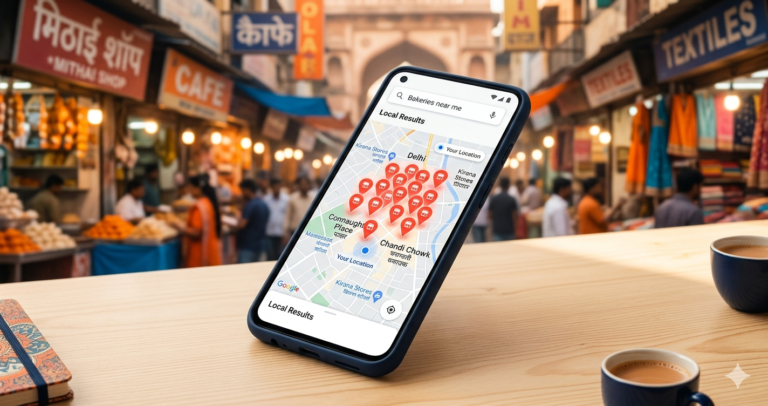
Introduction: Why Google Business Profile Optimization Matters in 2026
For local businesses, being visible when customers search online is no longer optional. Today, people rely on Google Search, Google Maps, and AI-powered search experiences to discover nearby businesses, compare services, read reviews, and make buying decisions.
A properly optimized Google Business Profile (GBP) can help businesses appear in local search results, improve customer trust, increase website visits, and generate more calls or inquiries.
With the rise of AI search experiences like Google AI Overviews, local businesses now need more than basic profile creation. They need a complete strategy that combines Google Business Profile SEO, local SEO, and AI search optimization for local businesses.
This guide explains how to optimize Google Business Profile effectively, improve rankings, and increase AI-powered local search visibility.
What Is Google Business Profile Optimization?
Google Business Profile optimization is the process of improving your business listing on Google so that it appears more frequently in relevant local searches.
A well-optimized profile helps Google understand:
- Who you are
- What products or services you provide
- Where you operate
- Why customers should choose your business
Google Business Profile optimization includes updating business information, improving reviews, adding relevant content, optimizing categories, posting regularly, and maintaining accurate details.
For businesses targeting local customers, GBP is one of the most powerful tools for improving visibility on Google Maps and local search results.
Why Google Business Profile SEO Is Important for Businesses
A Google Business Profile works as a digital storefront for your business.
When optimized correctly, it helps you:
1. Increase Local Visibility
Customers searching for services near them often see Google Maps listings before visiting websites.
An optimized profile increases your chances of appearing in:
- Google Maps results
- Local search results
- “Near me” searches
- AI-generated search recommendations
2. Build Customer Trust
Customers use your GBP profile to check:
- Reviews
- Photos
- Business information
- Working hours
- Services
A complete and updated profile creates confidence before a customer contacts you.
3. Generate More Leads
A strong profile encourages users to:
- Call your business
- Visit your website
- Request directions
- Send inquiries
For service-based businesses and SMBs, GBP can become a consistent lead generation channel.
Why Google Business Profile SEO Is Important for Businesses
Google Business Profile (GBP) SEO is essential because it directly improves local visibility, credibility, and customer engagement. It helps businesses in New Delhi and beyond show up in Google Search, Maps, and the “Local Pack” when customers look for nearby services. A well-optimized profile builds trust, drives foot traffic, and increases conversions.
When optimized correctly, it helps you:
- Boosts Local SEO
- GBP ensures your business appears in Google Maps and the Local Pack (top 3 listings) for searches like “best café near me.”
- Nearly 46% of Google searches are local. A strong profile connects you directly to nearby customers.
- Builds Credibility
- Verified profiles show legitimacy.
- Businesses with GBP are seen as 2.7 times more trustworthy than those without.
- Positive reviews and regular updates encourage customers to choose you over competitors.
- Provides Insights
- GBP provides analytics on profile views, website clicks, and direct calls.
- These insights help improve your SEO and marketing strategies.
- Enhances Engagement
- You can respond to reviews, post updates, share photos, and answer FAQs.
- This interaction builds loyalty and improves customer satisfaction.
The Core Problem with Ignored Local Listings
The biggest issue most service-based business owners face is treating their local search presence like a static digital billboard. You might have your address and phone number listed, but a bare-bones setup will not help you improve local search ranking. Competitors who actively manage their digital storefronts will consistently outrank you and capture the exact leads you want.
When you fail to grasp how to optimize Google Business Profile, your digital presence suffers from several compounding problems. To truly improve local search rankings, you need to understand where your current setup falls short.
- Incomplete Information: Missing business hours or service details frustrate potential customers.
- Stagnant Visuals: Profiles with zero new photos look abandoned and untrustworthy.
- Unanswered Reviews: Ignoring customer feedback signals poor customer service to both buyers and search engines.
- Irrelevant Categories: Choosing the wrong primary business category confuses the search algorithm.
- Zero Updates: Failing to post offers or updates makes your business look inactive compared to competitors.
The Shift Toward Intent-Driven Local Search
Search engines are getting incredibly smart at understanding exactly what a user wants. We are now seeing a massive shift toward AI search optimization for local businesses. The search engine no longer just matches keywords. It looks at user proximity, past behaviour, and how authoritative your listing appears.
This is where Google AI Overviews and local SEO begin to merge. AI summaries are starting to pull data directly from highly detailed business profiles to answer complex user queries. If you want your business recommended by these intelligent systems, your profile data must be rich, accurate, and frequently updated.
- Contextual Relevance: AI systems read your reviews and descriptions to understand exactly what you sell.
- Verification Signals: Consistent updates prove to the algorithm that your business is currently operational.
- Behavioral Metrics: The system tracks how many people click for directions or call your number.
- Trust Authority: A steady stream of positive reviews acts as a primary trust signal for AI recommendations.
The Framework: How to Optimize Google Business Profile
To master Google Maps SEO optimization, you need a systematic approach. The most successful agency owners and digital marketing professionals treat their local profiles as dynamic social platforms rather than static directories. Following core Google Business Profile best practices ensures your foundation is solid enough to build upon.
When you ask how to optimize Google Business Profile effectively, the answer lies in a four-pillar framework. At GET Marg, we frequently help brands implement these exact pillars to establish immediate local authority.
- Pillar 1: Data Accuracy. Ensure your Name, Address, and Phone Number match exactly across your website, social media, and local listing.
- Pillar 2: Visual Storytelling. Upload high-quality photos of your exterior, interior, products, and team members every single week.
- Pillar 3: Reputation Management. Respond to every single review within 24 hours, whether it is positive or negative.
- Pillar 4: Active Engagement. Use the Q&A feature and regular profile posts to keep your digital storefront active.
How to Optimize Google Business Profile Step-by-Step
1. Complete Your Business Information
The first step in any Google Business Profile setup guide is completing every section accurately. A complete profile gives Google detailed information about your business and helps customers find the right information before contacting you.
Start by logging into your Google Business Profile account and reviewing every available section. Do not leave important fields incomplete because missing information can reduce trust and affect your local search visibility.
Update the following details carefully:
- Business name
- Address
- Phone number
- Website URL
- Business hours
- Holiday hours
- Service areas
- Business description
- Appointment links (if applicable)
- Business attributes
- Contact options
Business Name
Enter your official business name exactly as it appears in the real world. Avoid adding extra keywords, locations, or promotional words that are not part of your registered business name.
For example:
Correct:
“ABC Digital Solutions”
Incorrect:
“ABC Digital Solutions Best SEO Agency in Mumbai”
Using unnecessary keywords in your business name can violate Google guidelines and may negatively impact your profile.
Address and Service Area
Make sure your physical address is accurate and matches your website and other online listings.
If you serve customers at their locations instead of having a customer-facing office, configure your service area properly.
For example:
A home cleaning company can add areas like:
- Mumbai
- Thane
- Navi Mumbai
This helps Google show your business to customers searching within those locations.
Phone Number and Website
Use a phone number that customers can easily reach. Avoid frequently changing contact details because consistency helps build trust.
Add your official website URL and ensure it directs users to a relevant page, such as:
- Homepage
- Service page
- Location page
- Booking page
Business Hours
Keep your working hours updated. Incorrect timings can create a poor customer experience.
Also update:
- Weekend hours
- Holiday closures
- Special business timings
If customers visit your location and find it closed despite Google showing it as open, it can lead to negative reviews.
Business Description
Write a clear description explaining:
- What your business offers
- Who you serve
- Your location
- Your key advantages
Use natural keywords related to your services, but avoid stuffing keywords unnecessarily.
Maintain Information Consistency
Make sure your business details match across:
- Website
- Social media profiles
- Online directories
- Review platforms
Consistent information improves credibility and helps Google understand your business better.
2. Choose the Right Business Category
Selecting the correct primary category is one of the most important Google Business Profile best practices.
Your category tells Google what your business does and helps determine which searches your profile appears for.
Start by researching categories related to your business. Choose the category that most accurately represents your main service or product.
For example:
A restaurant should not choose only “food business” when a specific category like “Indian restaurant” is available.
Use:
- One accurate primary category
- Relevant secondary categories
Your primary category should represent your main offering.
Example:
A digital marketing agency may choose:
Primary category:
“Marketing agency”
Secondary categories:
- Internet marketing service
- Advertising agency
- Web design service
Avoid selecting unrelated categories just to gain visibility. Incorrect categories can confuse Google and attract irrelevant traffic.
Review your categories regularly because Google updates available business categories over time.
3. Optimize Your Business Description
Your business description should naturally include relevant keywords while clearly explaining your value.
A strong description helps both customers and search engines understand your business.
Include:
- Your main services
- Location served
- Target customers
- Experience
- Unique selling points
- Business strengths
Example:
Instead of:
“Welcome to our company.”
Write:
“We help small businesses improve online visibility through digital marketing, local SEO, and Google Business Profile optimization.”
Keep your description customer-focused. Explain how your business solves problems instead of only listing services.
Avoid keyword stuffing. Repeating the same keywords multiple times can make your description look unnatural and may reduce trust.
4. Add High-Quality Photos and Videos
Visual content improves engagement and builds credibility.
Customers often check photos before deciding whether to contact a business.
Upload:
- Business photos
- Product images
- Team photos
- Office/store images
- Before-and-after visuals
- Customer experience photos
- Service demonstration videos
Use clear, high-resolution images that represent your actual business.
For example:
A restaurant should upload:
- Interior photos
- Food images
- Staff photos
- Menu highlights
A service business should upload:
- Team images
- Work examples
- Project results
Regular uploads show Google that your profile is active and maintained.
5. Collect and Manage Customer Reviews
Reviews are one of the strongest trust signals for local businesses.
A profile with positive, genuine reviews is more likely to attract customers and improve local visibility.
Encourage satisfied customers to leave feedback by:
- Sending review links after successful service
- Asking customers personally
- Adding review requests in follow-up messages
Best practices:
- Respond to every review
- Thank customers for positive feedback
- Address negative feedback professionally
- Add relevant keywords naturally in responses
Example:
“Thank you for choosing us for your website development project. We appreciate your trust in our digital solutions.”
Avoid copying the same response for every review. Personalized replies create better engagement.
6. Use Google Posts Regularly
Google Posts help keep your profile fresh and provide customers with updated information.
You can share:
- Offers
- New services
- Updates
- Events
- Customer stories
- Product launches
- Announcements
Create posts that encourage action.
Examples:
- “Book your free consultation today”
- “Explore our latest service package”
- “Get 20% off this month”
Use images, clear descriptions, and call-to-action buttons whenever possible.
Regular posting improves customer engagement and supports local visibility.
7. Add Products and Services
Adding services helps Google understand your offerings and improves your chances of appearing for specific searches.
Create detailed service listings with:
- Service names
- Descriptions
- Pricing (if applicable)
- Relevant details
For example:
Instead of adding:
“SEO”
Add:
“Local SEO Services for Small Businesses”
A detailed service description helps Google match your profile with relevant customer searches.
Review your services regularly and update them whenever your business introduces new offerings.
8. Optimize for Google Maps SEO
Google Maps SEO optimization focuses on improving your visibility when users search locally.
A strong Maps presence helps nearby customers discover your business and take action.
Key actions:
- Keep business information updated
- Add location-specific keywords naturally
- Collect quality customer reviews
- Upload fresh photos regularly
- Maintain active profile engagement
- Add accurate service information
- Build local authority through online mentions
Also ensure your website supports your Google Maps strategy by including:
- Location pages
- Local keywords
- Contact details
- Service information
A well-optimized Google Business Profile combined with strong local SEO helps convert nearby searches into calls, visits, and inquiries.
9. Enable Messaging on Google Business Profile
Enabling messaging on your Google Business Profile allows potential customers to contact you directly from Google Search and Google Maps.
This feature helps businesses respond quickly to customer questions and improve engagement.
To make the most of GBP messaging:
- Turn on chat functionality in your profile
- Set up notifications so you do not miss inquiries
- Respond as quickly as possible
- Provide helpful answers about services, pricing, and availability
Fast responses improve customer experience and can increase the chances of converting searches into leads.
For service-based businesses, messaging creates an additional communication channel that makes it easier for customers to take the next step.
10. Track Performance with Insights
Optimizing your Google Business Profile is not complete without monitoring performance.
Google Business Profile Insights helps you understand how customers discover and interact with your listing.
Track important metrics such as:
- Search queries used to find your business
- Profile views
- Website clicks
- Phone calls
- Direction requests
- Message interactions
- Customer actions
Use these insights to identify what is working and where improvements are needed.
For example:
If customers are finding your profile through specific services, you can create more content around those offerings.
Regular performance tracking helps you improve your Google Business Profile SEO strategy and make data-driven decisions for better local search visibility.
Local Search Truths and Data
Understanding the data behind local search behavior makes it clear why these efforts matter so much. When you want to improve local search ranking, you must look closely at how users actually behave on their mobile devices. You cannot ignore the mathematics of local digital discovery.
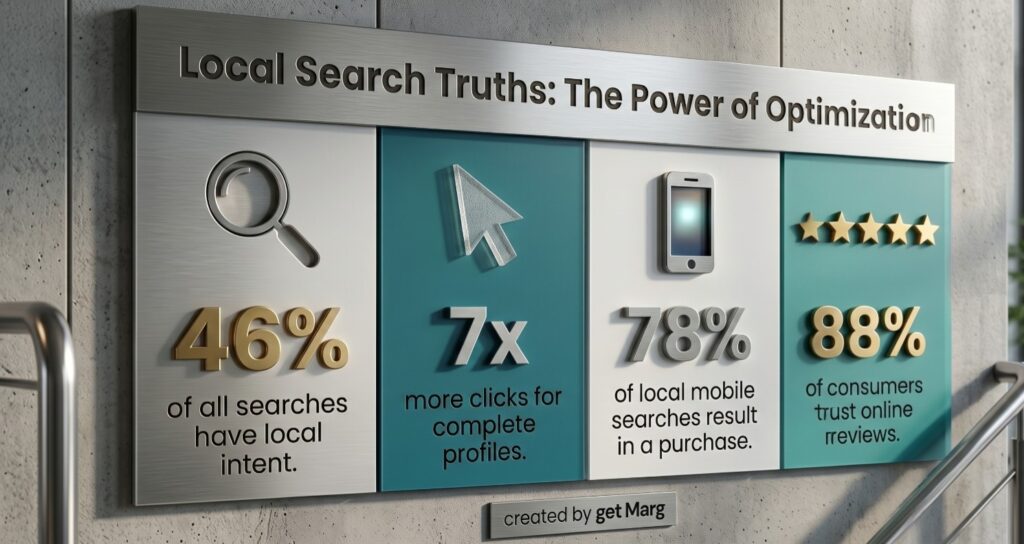
The numbers reveal exactly how consumer habits are shaping the future of retail and service industries. Here are the core statistics you need to know about local search behavior right now.
| Consumer Behavior Metric | Business Impact |
| Around 46% of all searches have local intent | Nearly half of all search traffic is looking for a nearby solution |
| Complete profiles receive 7x more clicks | Filling out every field drastically improves your search visibility |
| About 78% of local mobile searches end in an offline purchase | High-intent mobile users convert at an incredible rate |
| Nearly 88% of consumers trust online reviews | Digital reputation carries the exact same weight as personal recommendations |
How Zomato Mastered Google Maps SEO optimization
Let us look at a real-world example of exceptional digital growth and local dominance. Zomato did not just rely on a well-designed app to attract hungry customers. As they expanded across Indian cities, they executed a masterclass in local discovery and Google Maps SEO optimization.
They treated neighborhood searches as highly unique digital entities. By focusing heavily on localized content, they ensured every specific search query led right to their partner restaurants.
- They optimized local listings with high-intent keywords like “best butter chicken in Delhi” to capture specific neighborhood intent perfectly.
- They utilized Google Maps SEO optimization to ensure partner restaurants ranked highly in the highly coveted local pack.
- Their team ensured that menus, operating hours, and photos were constantly updated to signal freshness to the search algorithm.
- They built an ecosystem where reviews and user photos naturally kept the listings active without manual intervention.
Common Mistakes Hurting Your Google Business Profile ranking factors
Many businesses try to grow but end up hurting their own visibility through outdated and risky tactics. The most common error is keyword stuffing the official business name. If your legal name is Sharma Plumbers, do not list it as Sharma Plumbers Best Cheap Service in Delhi.
Another major failure point is neglecting Google AI Overviews and local SEO entirely. When you do not provide rich answers in your Q&A section, AI systems simply skip over your business. To protect your presence, avoid these frequent errors.
- Leaving bad feedback unanswered shows future customers you do not care about resolving genuine issues.
- Using generic stock photos instead of real images of your actual business environment destroys trust instantly.
- Having a different phone number on your website versus your local profile confuses both the algorithm and the customer.
- Ignoring AI search optimization for local businesses by leaving your specific service descriptions completely blank.
- Failing to understand how to optimize Google Business Profile by never posting updates or newly launched products.
How GetMARG Helps Businesses Improve Online Visibility
At GetMARG, we understand that modern businesses need visibility across traditional search and AI-driven platforms.
Our approach focuses on helping businesses improve:
- Local search presence
- Online discoverability
- Brand authority
- Customer trust
- Digital visibility
With changing search behavior, businesses need strategies that go beyond basic listings and focus on long-term online growth.
Conclusion
In order to increase local visibility and build trust with customers by utilizing a Google Business Profile and growing your authority to obtain quality leads, you will need to maximize the optimization of your Google Business Profile. When a business has a complete and up-to-date Google Business Profile it can be used for both of these strategies through increased ranking in the local search engine as well as for the use of artificial intelligence (AI) to find them on services such as Google Maps.
To improve your Google Business Profile (GBP) search engine optimization (SEO), businesses should emphasize providing customers with accurate business information, requesting customer reviews, listing the pertinent services that you offer, and responding to inquiries to build credibility.
Businesses will need to adapt as the digital search experience changes because AI is developing new methods for improving the digital search process. Companies that have an established GBP will become easier to find, will have increased credibility, and will use local search to drive revenue. Google’s Business Profile optimization is an important investment in developing your online presence for the continued success of your business.
Frequently Asked Questions (FAQ’s)
What is Google Business Profile optimization?
Google Business Profile optimization is the process of improving your business listing on Google to increase visibility in local search results. It includes updating business information, adding photos, managing reviews, optimizing categories, and keeping your profile active.
How does Google Business Profile help small businesses?
A well-optimized Google Business Profile helps small businesses appear in Google Search and Google Maps, attract local customers, build credibility, increase website visits, and generate more calls or inquiries.
What are the main Google Business Profile ranking factors?
The key Google Business Profile ranking factors include relevance, distance, and prominence. Google also considers profile completeness, reviews, customer engagement, business information accuracy, and online reputation.
How can I improve my Google Business Profile ranking?
You can improve your ranking by choosing the right business category, adding accurate details, collecting genuine reviews, posting regularly, uploading quality photos, adding services, and maintaining consistent business information online.
How often should I update my Google Business Profile?
Businesses should regularly update their profile by adding new posts, photos, offers, services, and responding to reviews. Frequent updates show Google that the business is active and relevant for customers.